

Versions & A/B compare
Music version control: every mix in one place, compared fairly
Stop naming files “final_v7_REAL_final.wav”. In Numa Studio a track keeps all its versions together, each with its loudness, its status and its comments, and you can compare any two of them in a click.
Free plan, no credit card required.
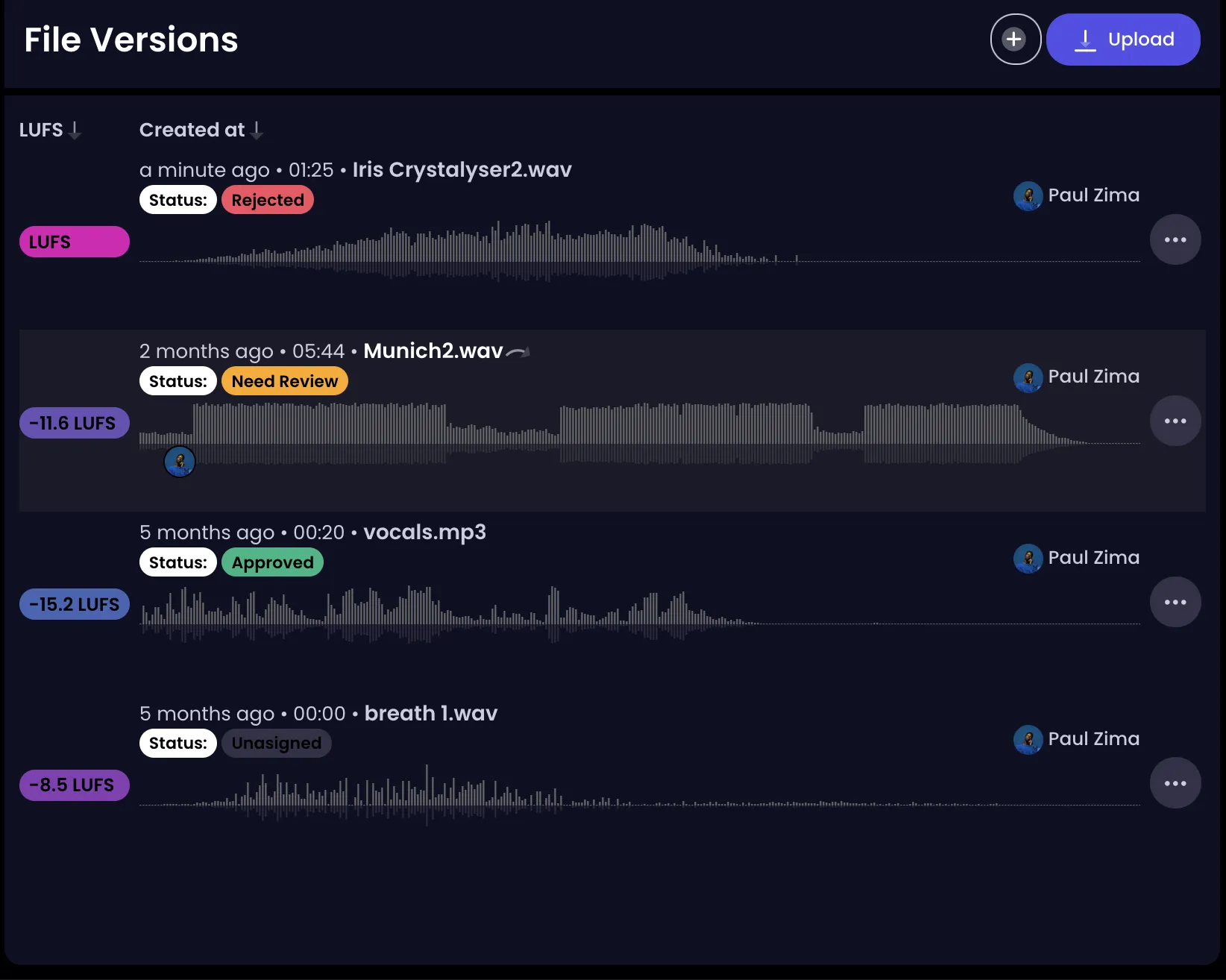
Upload a new version instead of a new file
When you bounce a new mix, add it as a version of the existing track. The link you already shared stays the same, the history stays in one place, and you choose which version is the main one.
- Version list: every version with its date, length, uploader and integrated loudness.
- Main version: promote the version that should be heard by default.
- Status per version: Approved, Need review, Rejected, or the statuses your workspace defines.
Compare mixes A/B without the louder-is-better trap
The A/B compare player plays a track against one of its versions in sync. Switch between A and B at the same position with a click or the B key, and hear exactly what changed.
Because a louder mix almost always sounds “better”, the comparison is loudness-matched: Numa Studio measures the integrated LUFS of each version and turns the louder one down by the difference. It never boosts the quieter one, and you can switch matching off if you want to hear raw levels.
Loudness analysis on every upload
Each audio file is analysed when it is uploaded: integrated loudness in LUFS and true peak in dBTP are displayed with the track, and LUFS is a sortable column in your lists. You can check a master against your delivery target without opening a DAW.
Comments stay with the version they are about
Timestamped comments are attached to the version they were written on, so notes on mix 3 do not get mixed up with mix 4. Combined with the version status, everyone knows which file is approved and what is still being worked on.
Who uses it
Related features
Frequently asked questions
How does the loudness-matched comparison work?
Numa Studio uses the integrated LUFS measured on each version. During A/B playback it lowers the louder version by the difference so both play at the same perceived level. The quieter version is never boosted, and matching can be turned off.
Can I compare two different songs?
The A/B player compares a track with its own versions, which is what you need to judge a remix, a new mix or a master against the previous one.
Which audio formats can I upload?
WAV, AIFF, FLAC, MP3 and M4A are recognised as audio. Your original file is kept as uploaded, and a streaming copy is created for playback.
Does sharing a new version change my share link?
No. Add the new mix as a version of the same track and the existing link keeps working.
Bring your next session into Numa Studio
Upload a track, share a private link and get feedback at the exact second it matters. Start on the free plan and upgrade when your catalog grows.
Start freeFree plan, no credit card required.
